
Insights
Articles
23 February 2026
9 min read
No Code vs. Low Code vs. Vibe Coding: The Complete Decision Framework for 2026
Praise Ohans
Author

Choosing the Right Development Approach in 2026
Software development has never been more accessible… or more confusing, whichever way you look at it. You've probably heard all three terms thrown around: no-code, low-code, and vibe coding. It seems as though every month comes with a new tech trend, making it difficult to keep up. If you are searching for a no-code vs low-code vs vibe coding 2026 comparison, you are not alone. Even founders want to know which of them is right for their project and team.
According to projections from Gartner, the low-code development technologies market is expected to reach $44.5 billion by 2026, growing at nearly 19% annually. By 2026, 75% of new enterprise applications will be built using low-code or no-code tools. Major technology companies now report that a significant portion of new code is AI-assisted. Startups are launching with codebases that are largely machine generated. In fact, what used to require a full engineering team can now be prototyped on a weekend.
Meanwhile, vibe coding is the newest of the bunch making waves. Y Combinator reported that 25% of startups in its Winter 2025 batch had codebases that were 95% AI-generated, and Google CEO Sundar Pichai revealed that over 30% of new Google code now comes from AI. Collins Dictionary even named "vibe coding" their Word of the Year for 2025.
What is driving this shift?
This is because there is a huge supply problem. The United States alone faces a deficit of roughly 500,000 software professionals. The impact of developer shortage on software development reflects in delayed launches and stalled digital transformation. The decision to adopt a no code and low code approach is a matter of survival and leverage. However, choosing the wrong approach can lead to technical, governance, or even scalability issues.
That is why this framework exists. To help you match the tool to your constraints.

What Is No-Code, Low-Code, and Vibe Coding
Before making any decision, we need clear definitions.
What Is No Code Development?
No code means zero programming required. It allows you to build applications using visual interfaces instead of writing traditional programming code. You build apps by dragging and dropping visual components inside a controlled platform. As Microsoft's own framing puts it, no-code requires "zero coding knowledge". You can build apps without coding knowledge. That is the point.
The platform handles the infrastructure, security layers, hosting, and much of the logic. It’s basically you trading deep flexibility for speed and guardrails. For many internal tools and operational workflows, that trade is more than acceptable.
No-code is especially powerful for marketing teams, operations departments, and founders without technical backgrounds. In fact, Gartner reports that in 2026 80% of low-code and no-code users operate outside formal IT departments.
Examples of no code tools include: Webflow, Bubble, Airtable, and Zapier.
What Is Low-Code Development?
If no-code removes programming almost entirely, low-code reintroduces it selectively. A low-code development platform provides a visual builder just like no-code, but allows developers to input custom scripts, APIs, or logic when needed.
Low code reduces boilerplate work while still enabling deep customization. You can scale, integrate legacy systems, and meet compliance standards without starting from scratch. While no-code is often marketed to "anyone," low-code is still very much a developer's tool because you still need to understand data structures, logic flows, and how APIs work to be effective with it.
Low code excels in regulated environments. These platforms often provide built-in governance, audit trails, role-based permissions, and compliance-ready deployment frameworks.
Examples of low code tools include: Mendix, OutSystems, Appsmith, and Microsoft Power Apps.
What Is Vibe Coding?
Talking about vibe coding is like entering new territory given that it is the newest entry in AI-assisted development. In February 2025, Andrej Karpathy, co-founder of OpenAI, coined the term to describe "fully giving in to the vibes, embracing exponentials, and forgetting that the code even exists." You describe what you want in plain language, and AI tools generate complete source code. You run it. If something breaks, you describe the fix. You never get to read the code; you just ship.
Unlike low code, vibe coding does not come with built-in governance layers. Security, compliance, scalability, and code quality depend heavily on oversight. If you are building production systems that handle sensitive data, vibe coding isn’t ideal for you.
Examples of vibe coding tools include: Cursor, Replit, Github Copilot, Claude Code.
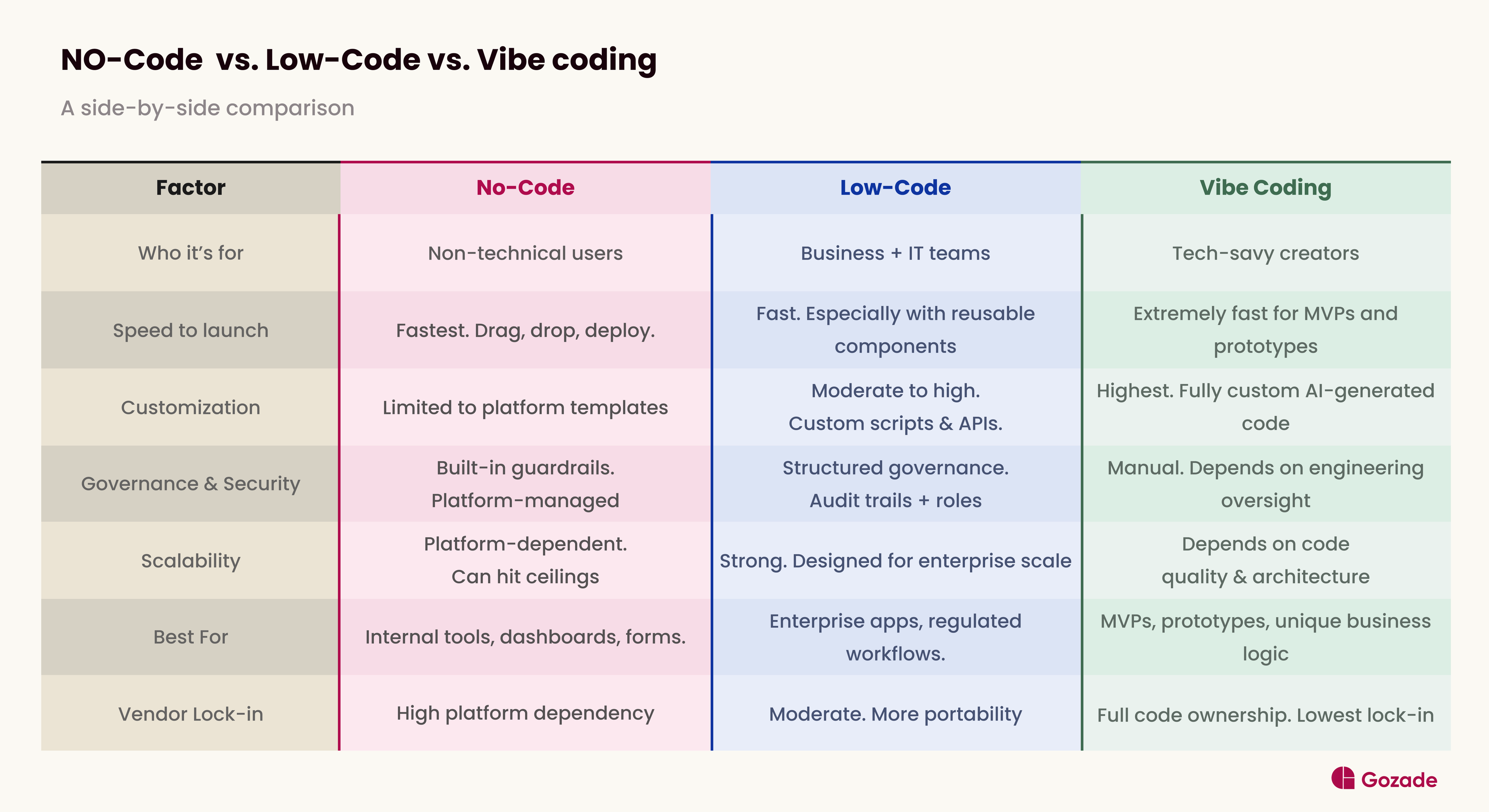
No-Code vs. Low-Code vs. Vibe Coding: Side-by-Side Comparison (Feature Matrix)
If you’re here for a no-code vs low-code comparison. Here is a clean visual breakdown.
When to Choose No-Code
If you are asking, “When should I use no-code?”, the concise answer is: use it when your workflow is common, well-understood, and owned by non-technical teammates. Workflows here could include internal dashboards, leave request systems, inventory trackers, and customer intake forms. Here, business logic is straightforward, and anyone can maintain the final output. You don’t need to hire an engineer to automate operations.
Limitations
This is the part you probably wouldn’t want to hear. No-code platforms do have limitations. Although sufficient for many common workflows, it does have its limits. Once your workflow becomes highly unique or complex, templates can start to feel restrictive. Scalability can also become an issue, especially if you’re running heavy, enterprise-grade systems that stretch the platform limit. There is also what is called “vendor lock-in”, where your application exists within the platform’s ecosystem, and migrating later becomes very complicated and restrictive.
When to Choose Low Code
“Now, when should I use low code?” Use it when your workflow is moderately to highly complex; your team includes both technical and non-technical members, and the application needs to scale across departments or comply with industry regulations.
Low-code is the right fit for cross-departmental enterprise apps, legacy system modernization, compliance-heavy workflows, and situations where business users need to collaborate with developers without either side having to write everything from scratch. It is faster than traditional development and more powerful than no-code.
Limitations
The first limitation is cost. Enterprise-grade low-code platforms like OutSystems and Mendix carry significant licensing fees that may be too expensive for small teams or early-stage startups. There is also a learning curve; while you don't need to be a software engineer, low-code platforms still require time to master, and developers accustomed to writing raw code may find the visual layer a tad limiting. Like no-code, vendor lock-in is also an issue: your logic, data models, and integrations are often tightly coupled to the platform, making migration restrictive if you ever decide to.
When to Choose Vibe Coding
If you are asking, "when should I use vibe coding?", the answer is to use it when your business logic is too unique for any platform's templates, you need to move fast, and you have access to at least basic engineering oversight for review. Vibe coding is best suited for MVPs, rapid prototypes, and custom tools where the workflow itself is your competitive edge. For example, things like proprietary pricing engines, complex scheduling systems, or bespoke user experiences that no drag-and-drop builder can replicate. If you want full ownership of your codebase, zero vendor dependency, and the ability to iterate daily, vibe coding is your fastest lane
Limitations
Because AI generates the code and you rarely read it, you can end up with a codebase that works but is poorly structured, hard to maintain, and especially full of hidden security vulnerabilities. This is a problem developers have started calling "vibe debt." Without built-in governance, compliance controls, or audit trails, it is entirely unsuitable for production applications requiring regulated data without serious engineering review. For startups deciding between low-code vs vibe coding, the decision usually comes down to how fast you need to ship versus how much structure you'll need as you grow. What worked for a solo founder's MVP may become unusable with a full team. Debugging also becomes very challenging: when something breaks in AI-generated code you never wrote, tracing the issue can be slow and disorienting. Vibe coding gives you speed, but at the expense of long-term stability.
Which Should You Choose?
This is the part you were probably anticipating where the final verdict is passed. Make no mistake, there is no winner or loser here. The mistake is thinking one approach is "better" in general. What you should do is match the tool to your actual business constraints.
The most effective builders are those who are conversant with all three: using no-code for accessibility, low-code for governance and scale, and vibe coding for creative breakthroughs and rapid iteration. It doesn’t have to be a showdown; it could be synthesis.
In short, pick the tool that matches your team's skills, your project's complexity, and your risk tolerance. Then build.
Frequently Asked Questions
Is vibe coding risky?
Yes, and the risk is proportional to how much you rely on it without oversight. Because AI generates code, you may never fully read or understand, security vulnerabilities, poor code structure, and hidden bugs are bound to happen.
Can I build an app with no code?
Absolutely. No-code platforms like Bubble, Webflow, and Glide allow you to build fully functional web and mobile apps without writing a single line of code. The limitation, however, is that your app lives within the platform's ecosystem, so highly custom or complex functionality may be limited.
Is low-code the same as no-code?
No, though they are often grouped. No-code requires zero programming knowledge and is built entirely on visual components. Low code requires some technical capability and allows developers to write custom scripts, logic, or API integrations when the visual layer isn't enough.
Can you vibe code with ChatGPT?
Yes, technically. ChatGPT can generate functional code from natural language prompts, which fits the vibe coding workflow. However, it lacks the integrated development environment that purpose-built vibe coding tools like Cursor or Replit offer, which means you'll need to copy, paste, and run code manually.
What AI is best for vibe coding?
It depends on your use case. Cursor is currently the most popular among developers for its deep IDE integration and context awareness. Replit is the go-to for beginners who want an all-in-one browser-based environment. Claude Code excels at handling complex, multi-file codebases with strong reasoning. GitHub Copilot is best for developers who already depend largely on VS Code. If you're just starting out, I suggest Replit or Cursor, as they are the easiest entry points.
TAGS:


Build what matters, with Gozade
Let's Talk
Gozade
Address 1
3rd Floor, 86-90 Paul Street, London, England, United Kingdom, EC2A 4NE
Address 2
SUITE E141, IKOTA SHOPPING COMPLEX, VGC AJAH LAGOS, NIGERIA
+2349032770671, +44 7873272932
Gozade builds smart digital solutions that help businesses grow and scale with confidence.
© 2026 Gozade. All rights reserved.