
Insights
Articles
20 April 2026
6 min read
Google Stitch Review 2026: A Gozade Verdict on the AI UI Design Tool Everyone Is Talking About
Praise Ohans
Author
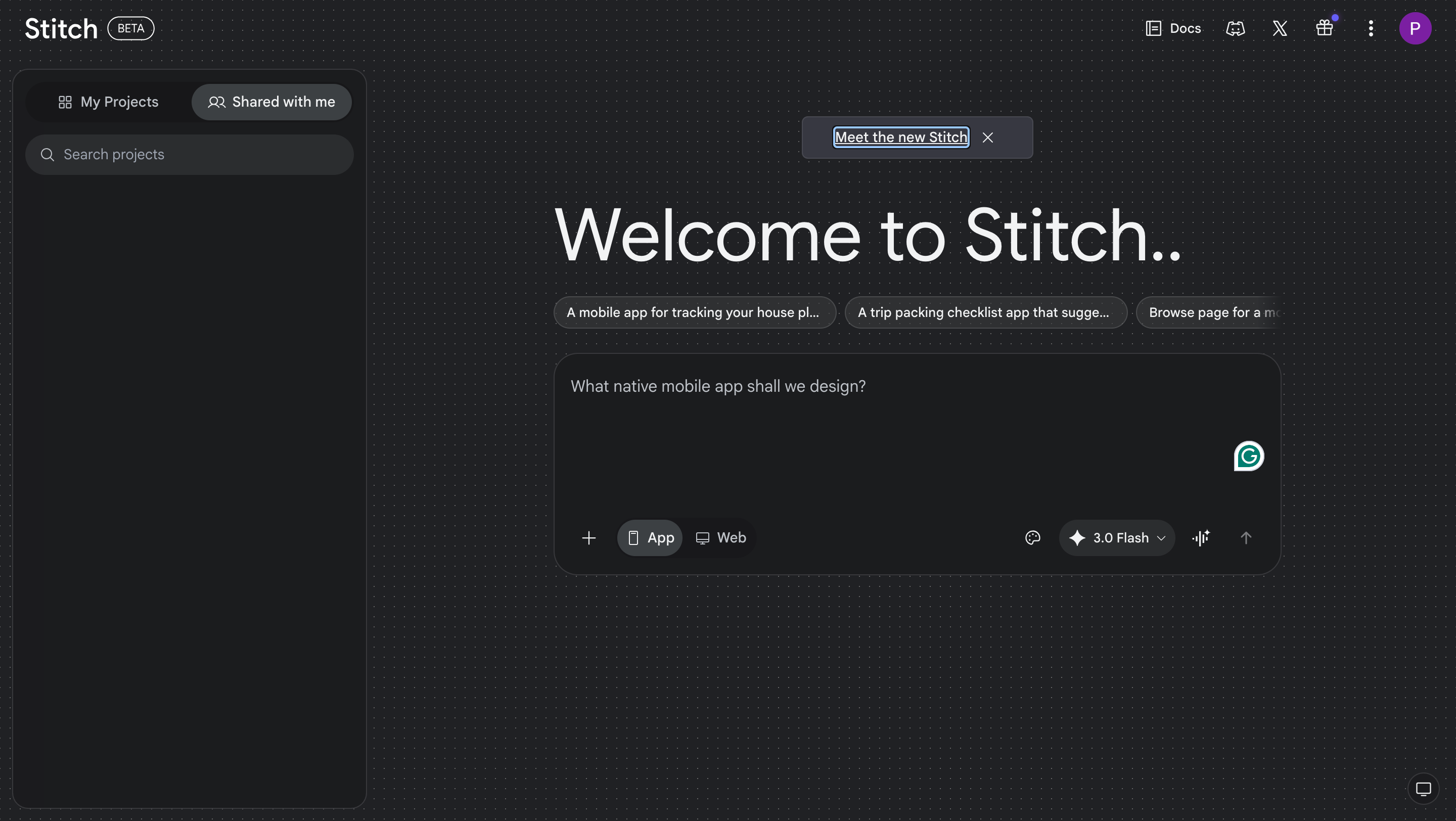
If you are a software developer or product designer, your feed has probably been full of Google Stitch screenshots since March 2026. We are in a space already crowded with AI tools, and Google Stitch has done more than just simply add to that list, and further fuel the “Will AI replace UI/U designers?” debate. The interface is quite simple for a tool with so many great features. A tool that turns a text prompt into a five-screen app UI per generation in under a minute, with exportable code. The major selling point, at least for now, is that it does all this for free. No subscription fee or credit card requirement.
Based on our test, here’s our take on what works, what doesn't, and whether it belongs anywhere near a serious development workflow in 2026.
What Is Google Stitch?
Google Stitch is an AI-powered UI design tool that generates high-fidelity interface designs from an input. The input can be almost anything: it could be a simple text prompt describing your app idea, a rough wireframe sketch you want to convert into a high-fidelity design, or a screenshot from an existing web interface. It requires nothing more than a Google account to get started.
A simple backstory matters here. Google did not build Stitch from scratch. In early 2025, Google acquired Galileo AI, which was one of the early AI tools for turning prompts into polished UI mockups, and rebranded it as Stitch, plugging it into the Gemini model family. It officially launched at Google I/O 2025 in May, started as a limited single-screen experiment, and shipped a major overhaul in March 2026 that generated a lot of talking points on social media. In fact, the March 2026 update was significant enough that Figma shares dropped by over 4% the day it dropped. When a design tool update moves stock prices, it only shows that people are paying attention.
What’s New in Google Stitch 2026
1. Infinite AI-Native Canvas
The old Stitch worked as a single-screen generator. The new version is built around an infinite canvas. Now, all your design iterations are contained in one workspace instead of a new one overwriting the previous one. Let’s say you tried four versions of an e-commerce hero section page. The four generations remain visible side by side for you to compare easily. This is especially useful for ideation and client presentations where you want a client to pick from a plethora of options.
2. Multi-Screen Generation (Up to 5 Screens)

Stitch can now generate up to five interconnected screens in a single generation. Now you can describe a checkout flow and get the cart page, shipping form, payment screen, confirmation page, and order tracking view. Typography, spacing, and color palettes stay consistent across all screens. As long as your prompt is detailed enough, you are sure to get an output. With the right prompt, the quality of screens generated is very good for a first draft compared to other AI UI generation tools out there. For a free tool, this is a jackpot.
3. Voice Canvas
Why type a long prompt manually when you can speak directly to your canvas. Now, you can say something like "Give me three different menu options" and Stitch generates the screens in real time. It can conduct a live design critique, interview you about your product goals, and generate revisions after transcribing your speech. We found this genuinely useful for exploration as it keeps you in creative flow without stopping to type. There is just something about talking about what you want rather than typing it.
4. DESIGN.md
This is a very useful addition that few people know about. DESIGN.md is an agent-friendly markdown file where you can store your design system. You can store your brand colours, typography guidelines, spacing system, and Stitch implements them across your projects or into other tools. You can also extract a design system directly from any live URL by simply inputtingthe website’s link and prompting it. This is a very useful starting point if you're working with an existing product.
5. Instant Prototypes + Play Mode
Stitch can link screens together into interactive prototypes with logical transitions generated automatically. You hit the play button to click through a simulated user flow. You can manually add a screen from the canvas for Stitch to connect, or have it generate a new linkable screen from scratch.
6.Figma Export + Code Export

Designs generated with Stitch can be easily exported to Figma with the layers, auto-layout, and editable components preserved. The code export covers HTML/CSS and Tailwind. Flutter output is clean and structured. The workflow most people employ is to use Stitch to generate the first 60–70%, export to Figma for refinement, and hand off to developers.
Where Google Stitch Falls Short
1. The Responsive Design Problem
The designs look responsive, but once you copy them to your Figma workboard, you’ll realize they aren’t. Stitch generates layouts optimized for whatever platform you specify in the prompt: mobile, web, or tablet. However, multi-breakpoint responsiveness requires additional manual work. The exported design gives you a foundation, but you'll need to fix how spacing and auto layout are used across all screens. Trust me, it can get a bit messy. Ungrouping an Auto Layout frame can skew the entire structure of a design screen. This is one of the most glossed over limitations.
2. Designs Look So Generic
There is just something about the generated screens that makes you spot that it was created by AI. The layout can have a clean hierarchy, sensible spacing, and modern component patterns, but they default to the most statistically common design decisions; nothing distinct. Stitch excels at standard interface patterns like login forms, dashboards, and e-commerce flows. It struggles when the design requires something that doesn't exist in the training data. So, if you are using an AI-generated checkout page, best believe it looks like every other checkout page. If visual distinctiveness is part of your product brief, Stitch will work against you.
It also needs to be mentioned that the designs it produces don’t always match the prompt you feed it. Most times, it doesn’t follow WCAG accessibility requirements even if you provide it a colour palette to work with.
3. Token Drift Across Long Sessions
Screens are often not consistent over a long working session. Screen one may look polished, while screen four drifts slightly with different spacing, and inconsistent component styles. The DESIGN.md feature helps, but doesn't fully solve this. Teams working on longer flows will most likely suffer inconsistency between screens repeatedly.
Gozade’s Verdict
Google Stitch in 2026 is indeed impressive for an AI ideation and rapid prototyping tool that helps for a quick first draft that would usually take days to come up with. The infinite canvas, voice mode, and multi-screen generation are useful features.
But the gap between "Stitch output" and "production-ready UI" is still quite evident. The workflow that makes sense is to start in Stitch and make edits in Figma. See Stitch as an accelerant, and not a human replacement. If your team needs production-ready, distinctive, responsive UI, a human designer is still your best bet.
TAGS:
Build what matters, with Gozade
Let's Talk
Gozade
Address 1
3rd Floor, 86-90 Paul Street, London, England, United Kingdom, EC2A 4NE
Address 2
SUITE E141, IKOTA SHOPPING COMPLEX, VGC AJAH LAGOS, NIGERIA
+2349032770671, +44 7873272932
Gozade builds smart digital solutions that help businesses grow and scale with confidence.
© 2026 Gozade. All rights reserved.